For many individuals, cross-border sellers, private-traffic operators and small businesses, WhatsApp is no longer “just a chat app” – it’s critical infrastructure. Customer support, post-sales service, login verification, internal communication – all tied to one number.
That’s why when you suddenly see “Your number is banned from using WhatsApp”, it’s not just about losing chat access. It can immediately impact revenue, operations and customer trust.
1. What Happens When Your WhatsApp Account Is Banned?
![ZEQ@]}%@J~2KDR3F$9[4IIJ_compressed.png](https://masmate.service-online.cn/production/files/0/1763971692537446570_81442.png)
When WhatsApp decides your account violates its policies, you’ll typically experience:
- You can’t log in or send messages The app shows a “banned” or “not allowed to use WhatsApp” message. Reinstalling, rebooting, or switching networks doesn’t help.
- Chat history is “locked” temporarily If you had local or cloud backups (Google Drive / iCloud), you can usually restore them after unban. During the ban, you can’t send new messages or sync normally.
- Contacts and group relationships are affected Your profile appears unreachable to others. Customers may assume you disappeared or went out of business.
- WhatsApp Business is even more sensitive For businesses, a ban can mean: Customer support interruption Negotiations and deals breaking mid-conversation Payment / verification flows failing Frequent bans can cause WhatsApp to classify your business as “high risk”.
- Device and behavior patterns may be flagged After repeated violations, even if you switch numbers but keep using the same device, IPs and patterns, you may be quickly banned again.
2. Why Was My WhatsApp Account Banned?
WhatsApp will never disclose its exact risk model, but based on official policy and countless real-world cases, the most common triggers fall into a few categories:
2.1 Using Unofficial or Modified WhatsApp Apps
- Examples: GB WhatsApp, FM WhatsApp, “enhanced” or “modded” builds.
- These apps bypass official limits and inject extra features or code.
- They violate WhatsApp’s Terms of Service and are a major source of bans in recent years.
Rule of thumb: only use the official WhatsApp or WhatsApp Business apps.
2.2 Impersonation, Fraud and Misrepresentation
- Pretending to be customer support, an official brand account, a bank or institution.
- Using logos, names and descriptions that intentionally look “official”, causing lots of user reports.
- Any behavior related to phishing, scams, or financial fraud can easily result in a permanent ban.
2.3 Spam and Unwanted Outreach to Unknown Numbers
- Mass broadcasting to phone numbers that have never saved you as a contact.
- Rapidly creating multiple groups, adding strangers, then blasting ads.
- Being blocked and reported by many users in a short time – this raises your risk score significantly.
Simple rule: The more you message people who don’t know you, and the more frequently you do it, the higher your ban risk.
2.4 Malicious Links, NSFW Content and Illegal Material
- Forwarding links that lead to malware, phishing pages or scam sites.
- Sharing content that violates local laws (violence, hate speech, illegal products, etc).
- Even if you’re “just forwarding”, you can get caught by automated systems plus user reports.
2.5 Aggressive Automation and Bot-like Behavior
- Using unapproved tools to auto-add contacts, auto-send messages, or mass-blast links.
- Obvious “robot rhythms”: 24/7 non-stop sending at perfectly fixed intervals.
- Scraping massive amounts of numbers and pushing them into bulk messaging flows.
WhatsApp is extremely sensitive to this. It’s one of the top reasons Business / private-traffic operations get into trouble.
2.6 Combined Anomalies and “Risk Profiles”
Even if you don’t do one huge “crime”, multiple small anomalies can add up:
- Frequently logging in/out from many unfamiliar devices.
- Constant IP hopping across countries, combined with aggressive contact adding.
- New numbers immediately blasting ads, joining groups and adding people.
That’s why multi-account users and cross-border teams should use something like
MasLogin anti-detect fingerprint browser
to isolate environments and control behavior patterns, instead of “raw” direct operations.
3. How to Unban a WhatsApp Account
First, you must identify whether you’re facing a temporary ban or a permanent ban – they require different strategies.
3.1 Temporary Ban: Countdown-Style Restrictions
Typical signs:
- The app shows “Your number is temporarily banned” plus an X-hour countdown.
- Often caused by unofficial apps or bursty abnormal behavior.
What to do:
- Immediately uninstall ALL unofficial / modded WhatsApp apps GB, FM, “Plus” builds, etc. Reboot your device and install only the official WhatsApp / WhatsApp Business app.
- Do not keep trying to log in while the countdown is active Don’t spam login attempts – you might turn a temporary ban into a permanent one.
- After the countdown ends, log in via the official app only Use the same device / region / number if possible. Once you’re back in, change your behavior: Reduce broadcasts and cold outreach Turn down or pause automation scripts
- If you trigger another violation, expect a permanent ban Treat a temporary ban as a serious “final warning.”
3.2 Permanent Ban: You Need a Formal Appeal
Typical signs:
- You see “Your number is banned from using WhatsApp” with no countdown.
- Reinstalling or switching devices doesn’t help.
At this point, your only realistic path is to appeal to WhatsApp.
Step 1: Use the In-App Review / Support Option
- On the ban screen there is usually a “Support / Request a Review” button.
- Tap it and briefly explain: How you use the account (personal / business) You believe this is a mistake and you’re willing to comply with the rules You will not use third-party apps or spammy tactics anymore
Step 2: Submit the Official Support Form
- Open your browser and go to: https://www.whatsapp.com/contact
- Select your platform (Android / iPhone / Business, etc).
- Provide: The banned number (with country code, e.g., +1 / +44 / +852 / +886) A valid email address (WhatsApp will reply here) A clear description of the issue (you can base it on your appeal template).
Step 3: Follow Up via Email (Optional but Recommended)
- Send an email to the official address listed on WhatsApp’s support page, commonly: support@support.whatsapp.com or the address shown for your region/product.
- Subject example: Request to review banned WhatsApp number +1XXXXXXXXXX
- In the body, include: Who you are and how you use the account (personal / business) That you believe the ban may be an error, and you have already stopped using third-party apps or spammy methods That you’re fully committed to complying with the WhatsApp Terms of Service
Step 4: Wait Patiently and Follow Up Reasonably
- Typical response time is 24–72 hours, sometimes longer.
- If rejected, you may submit one more appeal after 1–2 weeks, but don’t spam.
- If you receive multiple clear statements that the ban is irreversible: That number is effectively lost. You must redesign your communication stack: distribute risk across multiple numbers and environments.
At that stage, using a tool like MasLogin to isolate environments
and build a healthier, more compliant operation is essential to avoid “single point of failure”.
4. How to Prevent Your WhatsApp Account from Being Banned
Instead of relying on luck and hoping your appeal works, it’s far better to build prevention into your daily operations. The following six strategies are especially useful for multi-account users, cross-border teams and private-traffic operators.
4.1 Use MasLogin to Manage Multiple Accounts (Isolation + Risk Reduction)
Multi-device, multi-account setups are where many WhatsApp ban stories begin:
logging 10+ numbers on the same device, random IP hopping, identical fingerprints – all screaming “automation farm” to risk systems.
MasLogin anti-detect fingerprint browser is not about “breaking” risk controls. Its job is to:
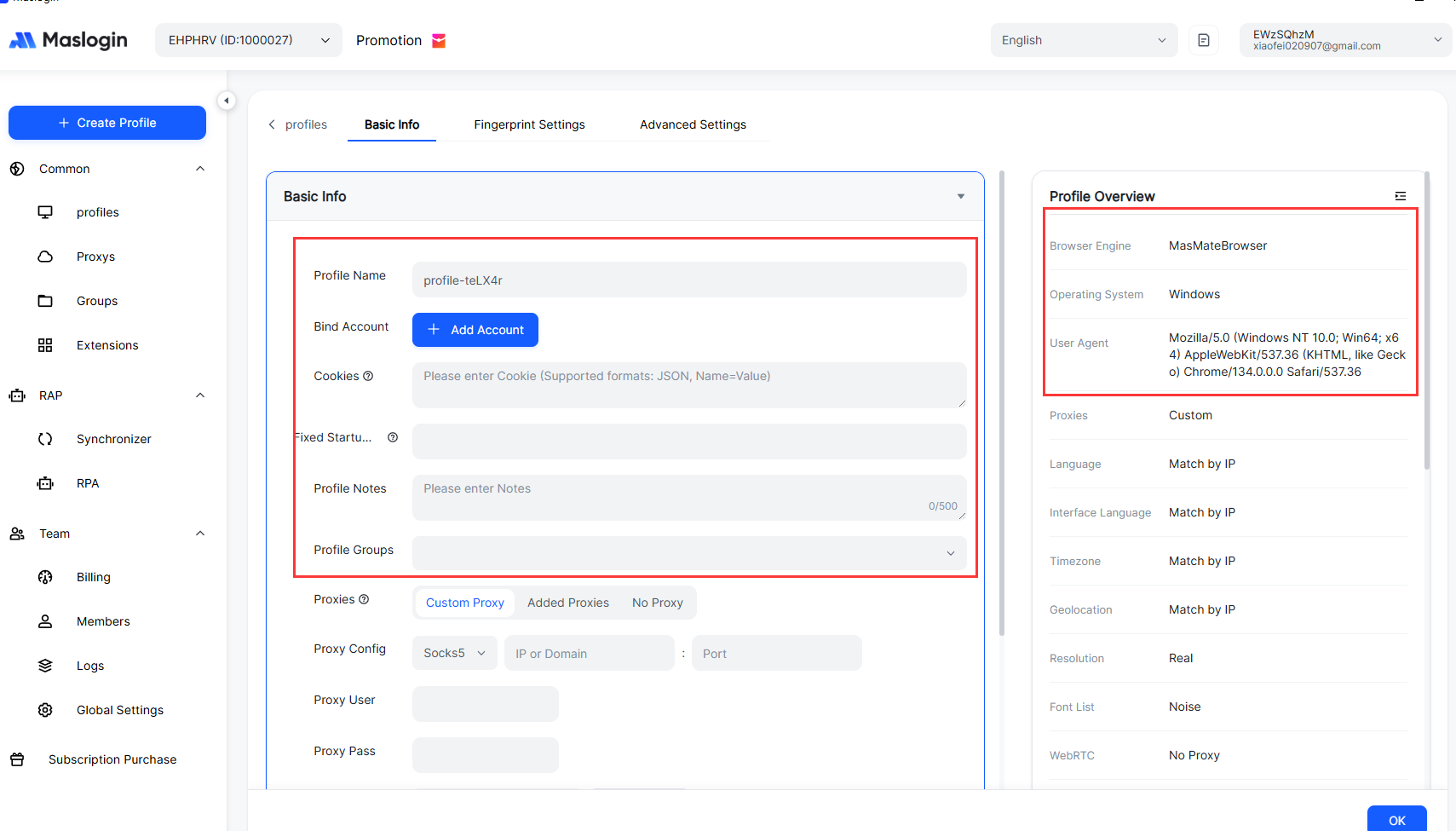
- Create a separate browser fingerprint environment for each WhatsApp Web / management backend Isolated user agents, time zones, WebRTC, Canvas, hardware fingerprints, etc.
- Prevent cross-contamination between accounts so one risky number doesn’t doom the others.
- Support team collaboration and permission control, assigning specific environments to specific operators.
- Combine with your own SOPs and pace-control rules to make behavior much closer to real end-users.
You can also point readers to your own detailed case studies, for example:
- Multi-account risk control insights → [MasLogin Blog](https://www.maslogin.com/blog) (replace with a specific article when ready).
4.2 Avoid Suspicious Behavior Patterns
- Don’t blast cold messages to large lists of numbers that have never saved you as a contact.
- Cut down on high-frequency broadcasts, especially those with ads or links.
- Be cautious with short links and unknown URLs – don’t blindly forward everything you receive.
- In the first 7–14 days for a new number, mimic real user behavior: Chat more with people who genuinely know you Minimize group-adding and promotional pushes
4.3 Strictly Follow WhatsApp’s Terms of Service
At least skim the key parts of the official rules once:
- WhatsApp Terms of Service
- WhatsApp Business Terms / API Policies
Key points include:
- No scams, illegal products or unlicensed financial services.
- No interacting with the service via unauthorized clients or modified apps.
- For commercial content, respect user choice, consent and opt-out preferences.
4.4 Limit Automation and Bots
If you must use automation (scheduled sends, bulk replies, etc.), follow these principles:
- Prefer official WhatsApp Business API or reputable, compliant SaaS providers.
- Avoid fully robotic 24/7 messaging with zero human intervention.
- Control sending frequency and batch size; give the system enough time to observe organic engagement.
- Move high-risk actions to other channels (e.g., email, website) and use WhatsApp for high-value conversations.
4.5 Limit Group Invites and Group Spamming
- Don’t forcibly add large numbers of strangers into groups just to bombard them with ads.
- Use group invite links instead of forced adds, letting users choose to join.
- When people repeatedly leave your groups or block you, take the hint and scale down.
4.6 Regularly Review Reports and Blocked Contacts
- Check your WhatsApp blocked contacts list. A large number of unknown blocks is a warning sign.
- Monitor broadcast performance: reply rates, opt-outs, complaints.
- Adjust content and frequency early, instead of waiting until the system “hard cuts” your account.
FAQ: Your Most Common Questions About WhatsApp Bans and Unbans
Q1: If my WhatsApp account is banned, can it always be unbanned?
A: No.
- Temporary bans usually resolve once the countdown finishes, as long as you stop violating policies.
- Permanent bans are not guaranteed to be lifted, especially for serious violations (fraud, malware, long-term use of mods). Appeals only give WhatsApp a chance to review your case – there is no “unban guarantee”.
Q2: I switched back to the official app. Why am I still getting banned?
A: If you previously used GB / FM or other mods for a long time, or were frequently reported, your number and behavior pattern may already be tagged as high risk. Moving to the official app is only a necessary step. You still need to:
- Reduce spammy messaging
- Adjust your pacing and campaign design
- Use an isolation tool like MasLogin to lower cross-account correlation
Q3: Do you have a recommended email template for appeals? What should I say?
A: Focus on three key elements:
- Clearly state the banned number (with country code) and how you use it.
- Explain that you believe the ban may be a mistake, and that you have stopped using third-party tools or spammy workflows.
- Confirm your willingness to fully comply with the Terms of Service and ask for a manual review.
Keep the tone polite and professional. Don’t threaten or rant – that never helps.
Q4: If I manage multiple WhatsApp accounts with MasLogin, does that increase my ban risk?
A: It depends how you use it.
- If you treat MasLogin as a “cover” to blast spam across dozens of numbers, you’ll still be banned.
- If you use MasLogin properly – for fingerprint isolation, environment separation and structured team permissions – it actually helps you: Reduce cross-account linkage Make behavior appear more like genuine end-users Combine compliance with better risk control, lowering overall ban probability
Q5: If this number can’t be unbanned, what can I do next?
A: Consider a strategic reset:
- Design a multi-number, multi-environment architecture so one ban doesn’t kill your whole operation.
- Move key customers to multiple channels (email, website accounts, Telegram, etc.).
- Use MasLogin or similar tools to give each number its own isolated environment and SOP, then rebuild from scratch with a more sustainable, policy-compliant strategy.




 (1) (1) (1).png)

