In 2025, Amazon unified its household sharing under Amazon Family and ended Invitee sharing for non-cohabitants. For users, that means a stricter “same primary address” requirement, while still keeping the upside of two co-habiting adults legally sharing one Prime membership—effectively halving the cost. This guide approaches the topic from a compliance-plus-practical angle: what Family can and cannot share, who’s eligible and how much you can save, a 5-minute setup flow, wallet authorization and privacy boundaries, the 2025 policy timeline, and common fixes. Whether you’re new to Prime, migrating from an older arrangement, or planning to maximize value during Prime Day and other promotions, this walkthrough helps you save money—compliantly—and spend it where it matters more.
What are Amazon Prime and Amazon Family?
- Amazon Prime: Amazon’s paid membership. Core benefits include fast/next-day delivery, Prime Video streaming, early-access deals, and member-only discounts.
- Amazon Family (formerly Amazon Household): Lets members at the same address share select Prime benefits. The standard setup is 1 Prime member + 1 co-habiting adult, with up to 4 child profiles (and, in some regions, continued support for teen profiles created earlier). Starting in 2025, Amazon strengthened the Family-branded sharing system worldwide and discontinued “Invitee” sharing for non-cohabitants.
Important update (effective Oct 1, 2025): Amazon has ended the Prime Invitee program. Shared benefits are limited to members at the same primary address, under the unified name Amazon Family. AP News
Who can share, and how much can you save?
- Eligible members: You and one other adult at the same address (each using your own Amazon account), plus up to 4 child profiles. In some regions, teen profiles created before Apr 7, 2025 remain supported.
- Expected savings: Two co-habiting adults using one Prime membership effectively split the cost (e.g., if the local annual fee is X, you still pay for a single membership; both adults enjoy compliant, co-habiting sharing). Non-cohabiting sharing is no longer allowed.
Which benefits are shareable—and which aren’t?
Commonly shareable
- Fast/next-day delivery (varies by region and item)
- Prime Video viewing within the account (concurrencies and catalogs follow local rules)
- Early-access/member-only deals and some shopping benefits
- Family Library: share purchased eBooks/apps/some digital content within the family group (subject to publisher/region limits)
The above reflects common practice. Always defer to your local site’s terms and service pages. Amazon Help
Commonly not shareable or heavily restricted
- Amazon Music (Prime-included tier) is typically not provided as a Family-share benefit. For multiple accounts listening simultaneously, consider the separate Amazon Music Family plan (availability varies).
- Prime Video Channels (paid add-on channels) generally do not transfer or share to other Family members.
Tip: Digital/media entitlements vary widely. Before you subscribe, check your country/region’s official terms and the specific policy pages for each service. AP News
Finish your Amazon Family (formerly Household) setup in 5 minutes
UI labels vary by region. Below is a generic flow with compliance highlights.
- Prep both accounts: You and your co-habiting member use separate Amazon accounts and confirm the same primary address.
- Open your account: In “Your Account,” search “Amazon Family”/“Household,” or use the Family-sharing entry point at the bottom of the Prime page.
- Send the invite: Enter your co-habiting member’s name and email. They typically have 14 days to accept; once accepted, your family group is created (exact timing can vary by site).
- Wallet authorization: The system prompts both parties to authorize shared payment methods (Wallet) for ordering and verification within the family group. This does not give you full visibility into each other’s detailed purchase history.
- Family Library: If desired, enable Family Library and choose which eBooks/apps to share (subject to publisher/region constraints).
Security & privacy
- Both parties keep separate accounts and order privacy. Sharing focuses on benefit access and payment method availability, not exposing transaction histories.
- When authorizing payment methods, rewards/cashback belong to the cardholder, and do not transfer just because the other adult places an order.
2025 policy changes & compliance notes
- Invitee program sunset: As of Oct 1, 2025, non-cohabiting members no longer receive shared shipping or other benefits. Impacted users may be offered limited-time discounts to renew as standalone Prime members. The Verge
- Tighter cohabitation rules: Sharing is restricted to the same primary address, aligning with the broader industry trend curbing cross-household sharing.
- Teen profiles: Some reports note that teen profiles created before Apr 7, 2025 remain supported; new creations/migrations may be limited. Always check your local site’s live rules.
Common misconceptions & quick fixes
- “We don’t live together—can we still share?” No. Sharing is limited to co-habiting family members.
- “Prime Music is shareable, right?” Usually not. For multiple listeners on separate accounts, get Amazon Music Family.
- “I can’t see the other adult’s orders, so I can’t pay for them.” With wallet authorization you can pay in a family context, but order histories remain separate.
- “Channels follow the Family.” Prime Video Channels typically don’t move or inherit via Family sharing.
- “I can copy another country’s rules.” Policies differ by country/site; always verify your local help pages.
How to share an Amazon account in MasLogin
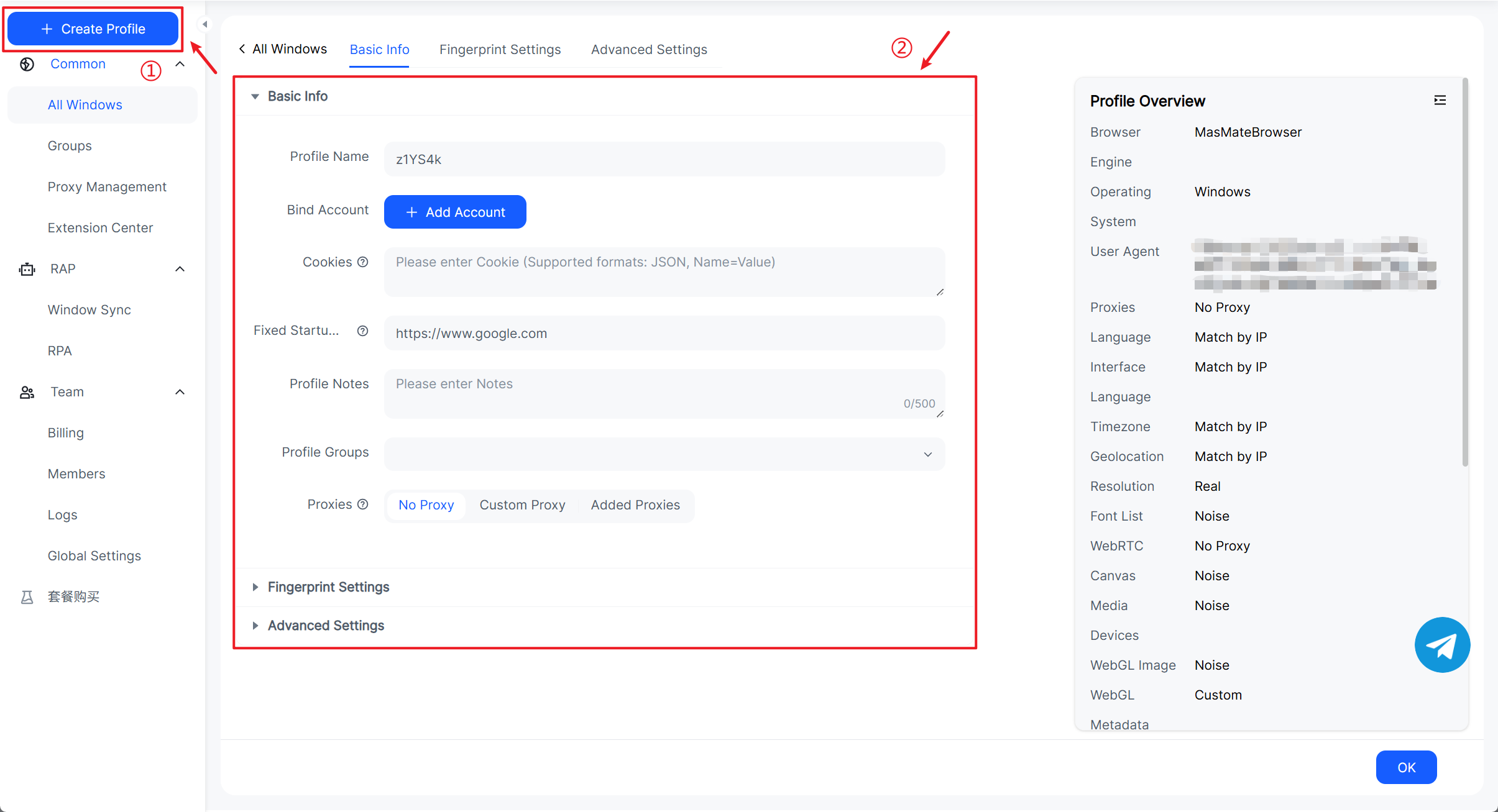
Step 1: Prepare an “Amazon environment”
- In MasLogin under All Windows, click Create Profile, name it something like
Amazon-US-Family-01, and group it under Amazon Family. - Align proxy and fingerprint settings with the account’s usual region (keep IP/language/time zone/geolocation and resolution in a common-sense combination).
- On first launch, sign in to Amazon and complete 2FA/trusted-device binding; confirm access to Prime and Orders.
- Under Advanced Settings, set Multiple Instances to Disabled (to prevent simultaneous logins that can trigger risk control). For Restore last pages, choose what fits your workflow (restore for continuous work; don’t restore for a more conservative posture).
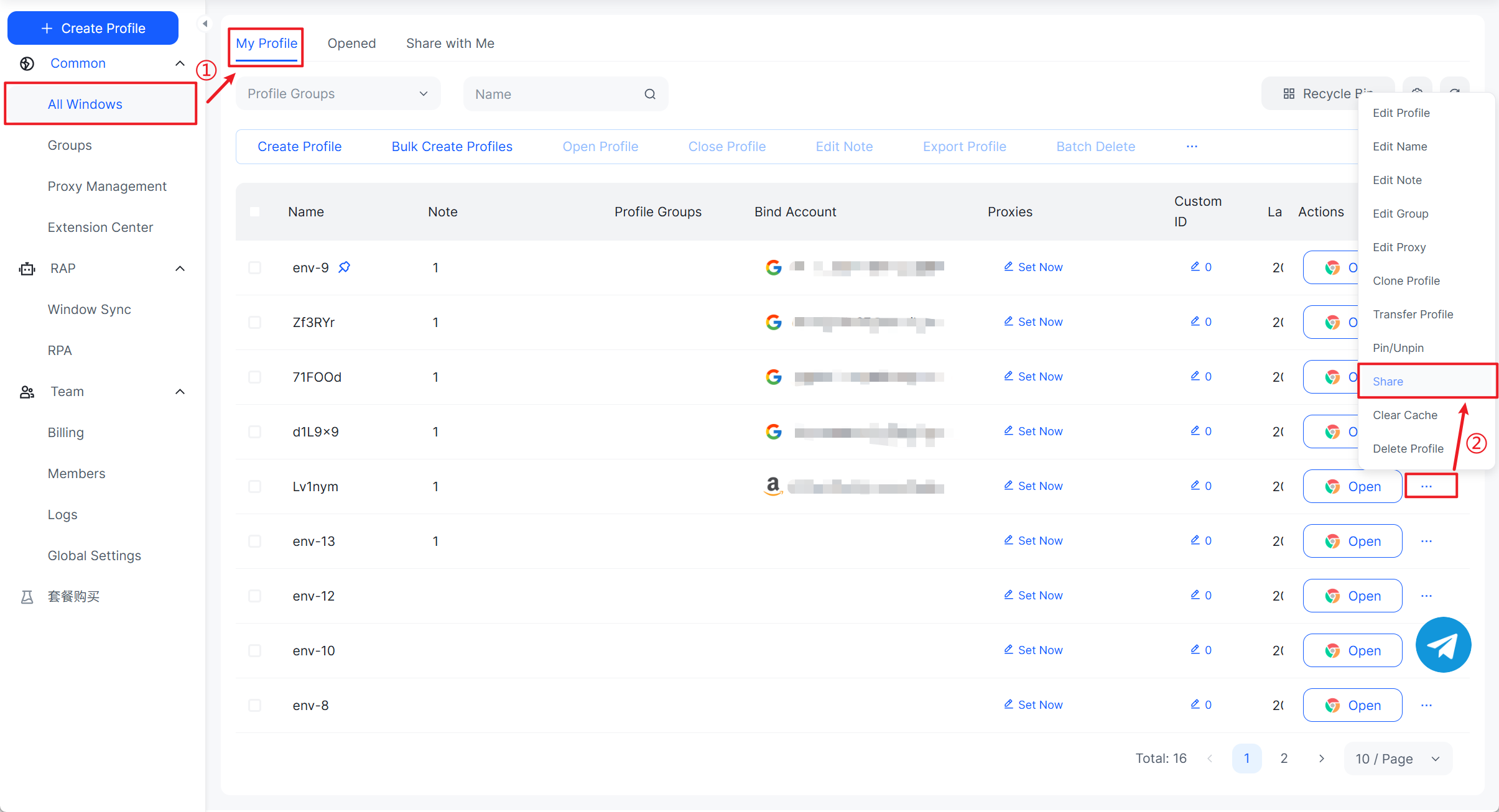
Step 2: “Share” the environment with your co-habiting member
- Back in All Windows, open … → Share on that environment.
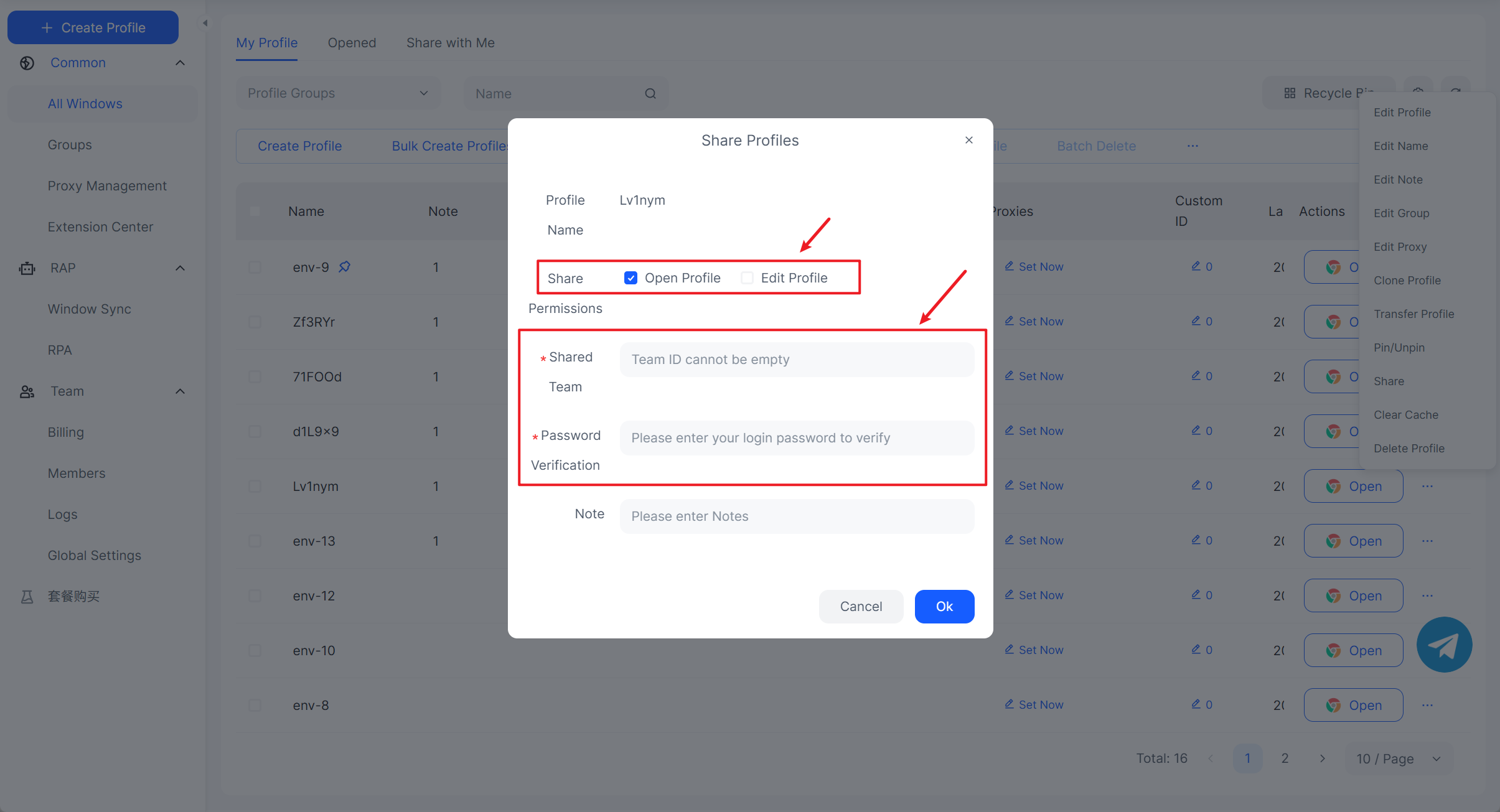
- Share permissions: For safety, grant only the minimum necessary (usually just “Open Profile”).
- Enter the Shared Team (visible at the top of their app) and pass the password check (your current account password). Add a note if helpful.
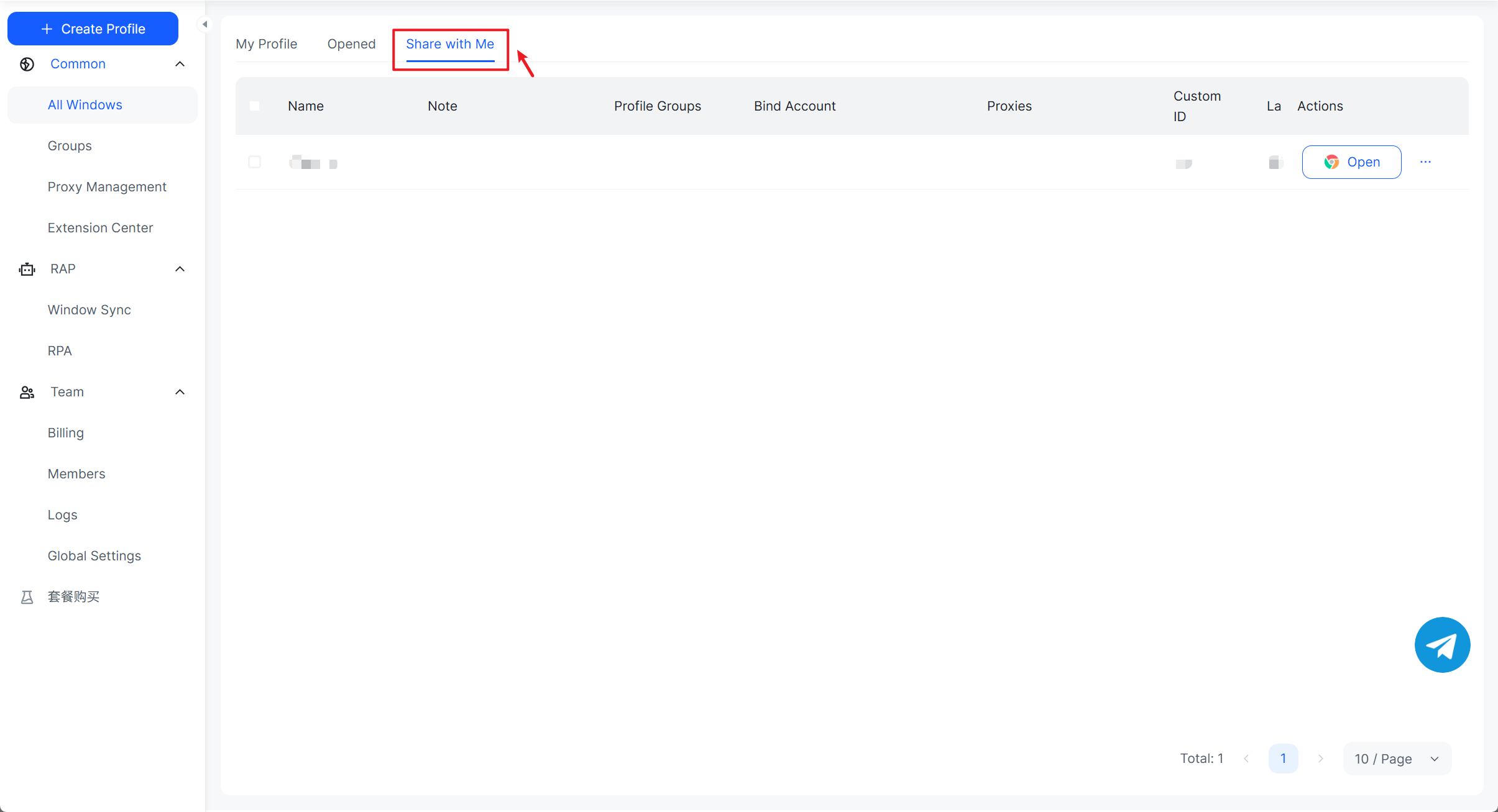
Step 3: Tips for the recipient
- After you send it, the recipient finds and opens the environment under Shared with Me; it’s also available under My Profile once accepted.
FAQ: Top 10 questions users ask
Q1: Can I still share Prime with friends/roommates who don’t live with me?
No. As of Oct 1, 2025, sharing is limited to members at the same primary address.
Q2: How do two adults split the membership cost?
Have one adult pay for Prime and invite the co-habiting adult within Amazon Family. Both receive benefits while paying for a single membership (subject to local terms and availability).
Q3: Can I hide my purchase history?
Yes. Family sharing does not expose your full order history. Accounts remain separate; you share benefit access and payment method availability.
Q4: Do we have to share a credit card?
During setup, Amazon prompts mutual wallet authorization to enable family orders, but rewards/cashback remain with the cardholder. You can choose which cards to authorize.
Q5: Can both adults watch Prime Video? What about simultaneous streams?
Adults in a Family typically get viewing access; concurrency, catalogs, and channels are governed by regional terms. Prime Video Channels subscriptions generally don’t share.
Q6: Is Prime Music shared?
Usually not. For multiple listeners on separate accounts, subscribe to Amazon Music Family (regional availability applies).
Q7: How do we manage teen/child accounts?
Create child profiles and choose shared content in Family Library. In some regions, teen profiles created before Apr 7, 2025 continue to work.
Q8: I’m traveling/long-term away from home. Do I still count as co-habiting?
Eligibility is based on your primary address. If you don’t meet the co-habitation requirement, you’re not eligible for Family sharing.
Q9: What happens to Invitee users?
The program has ended. Amazon has offered limited-time discounts for affected users to move to standalone Prime—watch your local site for exact windows and pricing.
Q10: How do I revoke Family sharing?
Remove members or disband the family group on your Amazon Family/Household management page. Once removed, shared benefits end; digital content availability depends on each purchase record and authorization.





_00000 (1).png)