Thinking about whether to share a Claude account? This guide gives a clear, practical path to decide if sharing is worth it, what’s compliant, and five secure ways to reduce risk—using an anti-detect browser like MasLogin for environment isolation, a role-based password manager, RDP/virtual machines for controlled access, shared prompts/team folders for collaboration, and multiple well-managed accounts for scale. We focus on three real-world needs—multi-account management, security & compliance, and team efficiency—with checklists and common pitfalls so you can avoid account flags, data leakage, and messy authorization. If you want the quick version, jump to “Can I safely share Claude Pro?” and “5 secure methods to share Claude.” For product capabilities and policy updates, rely on the official Anthropic website.
1) Why would you share a Claude account?
- Lower per-seat cost: Early-stage teams and freelancers can split Claude Pro to keep advanced capacity while staying on budget.
- Shared prompts & knowledge: Maintain a central prompt library, templates, and workflows so outputs stay consistent across writers, editors, and analysts.
- Fewer interruptions: Pro’s larger context window, higher usage limits, and faster responses cut queueing and mid-task pauses on long documents or code reviews.
- Audit & compliance: Centralized access with logs makes it easier to trace actions and reduce “shadow accounts” risk.
For product specifics and current terms, see Anthropic’s official site.
2) Can I safely share a Claude Pro account?
Yes—if you do it right. Safe sharing means:
- Understand and comply with the ToS;
- Use environment isolation + least-privilege access + activity logs;
- Avoid exposing raw credentials;
- Keep IP/timezone/language/DNS consistent to reduce risk signals.
Never paste the password in a group chat. Aim for revocable, auditable, role-based access.
3) Five secure ways to share a Claude Pro account
Method 1: Manage access with MasLogin (isolation + automation)
- How it works: In MasLogin, each teammate gets a unique fingerprinted browser environment (UA, Canvas/WebGL, fonts, timezone/language, storage) plus a dedicated proxy. Sessions and cookies stay isolated; access is scoped by role.
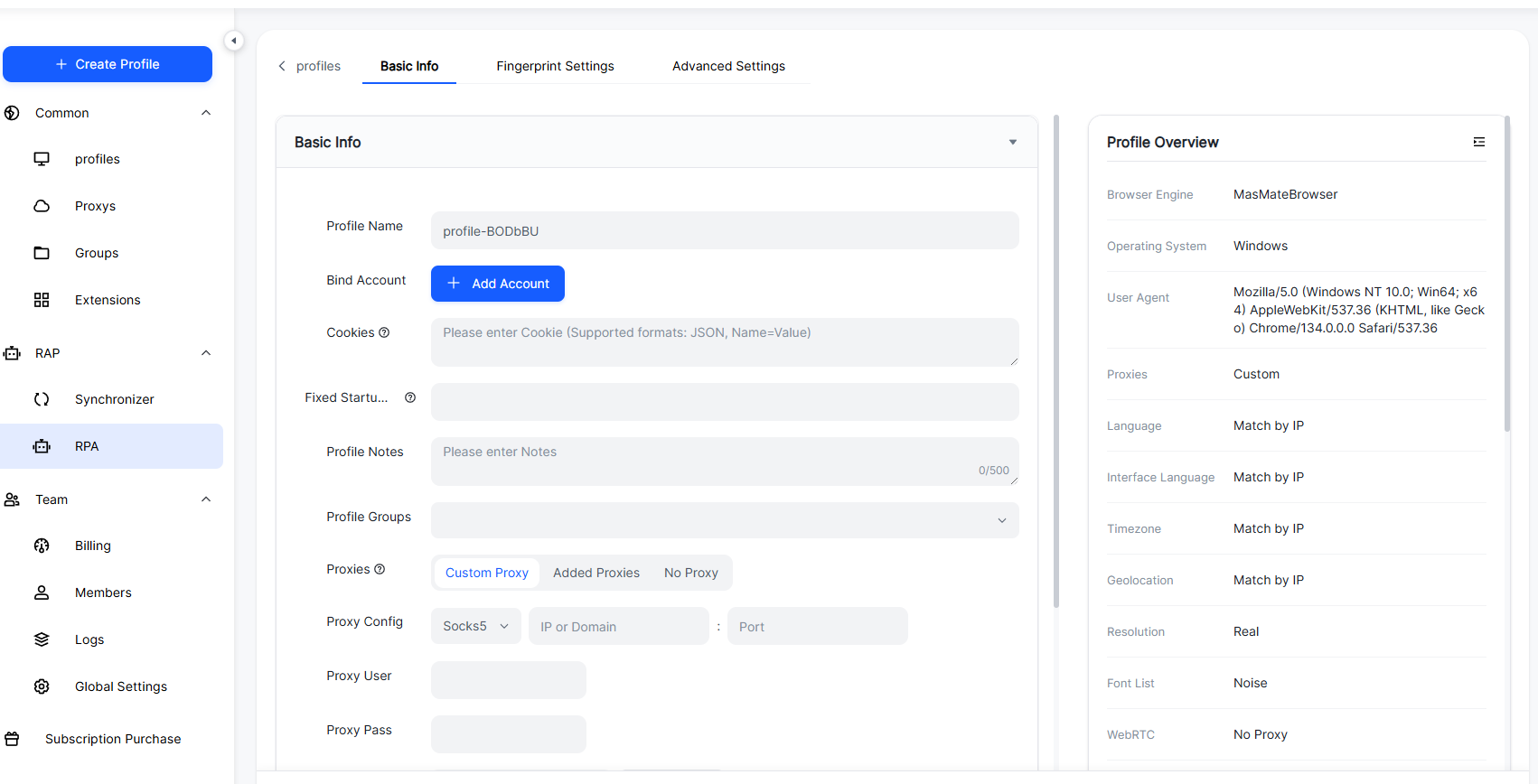
- Benefits: Strong isolation: One user ≠ another user (no cookie crossover). Auditability: Logins & actions are traceable for security reviews. Automation: Use RPA/API to batch routine tasks (prompt seeding, file uploads, archiving). Team controls: Roles, groups, approvals—without sharing raw credentials.
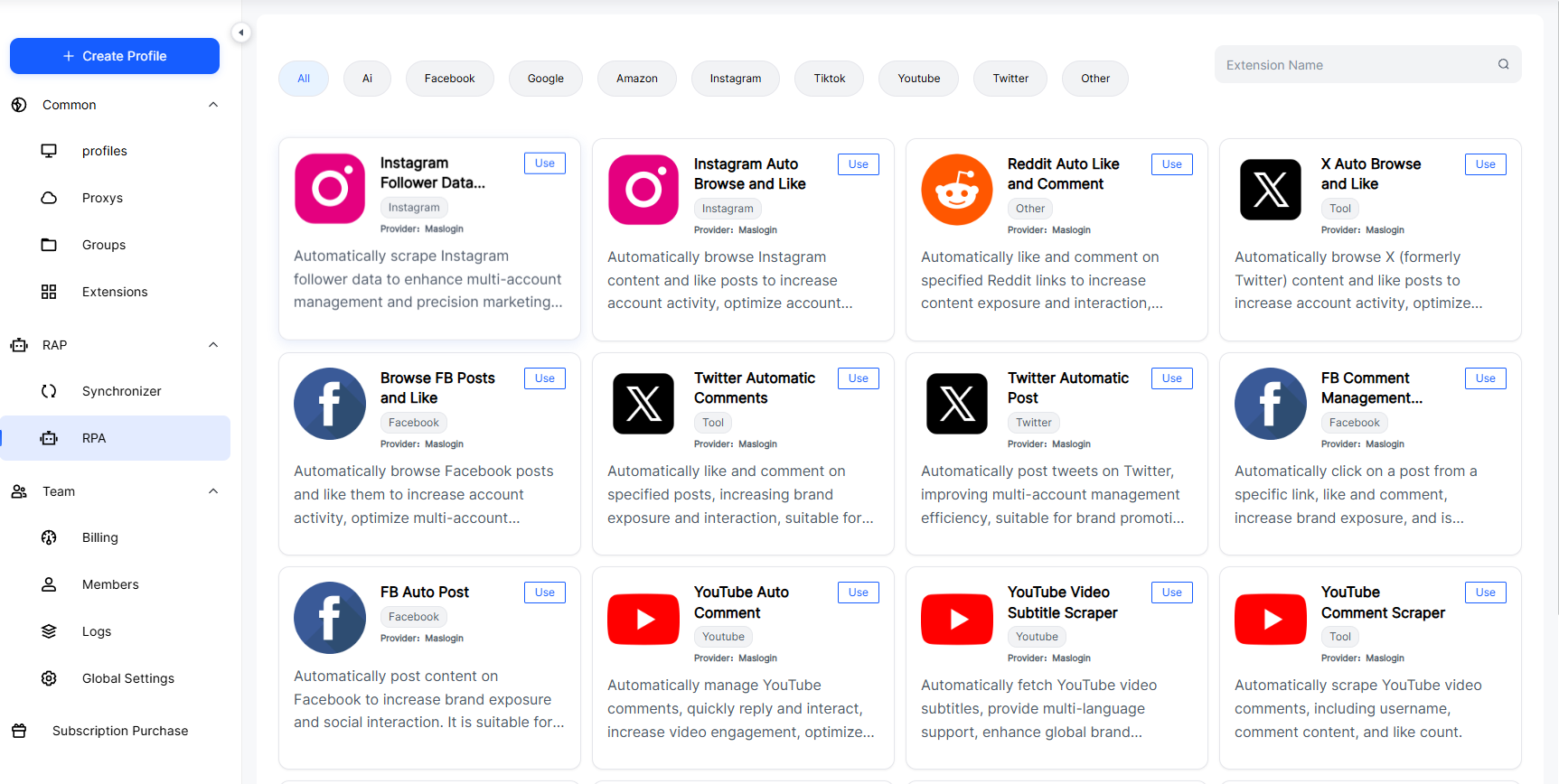
- Who should use it: Agencies, content studios, cross-border e-commerce, legal/localization teams that need scale + stability + compliance.
Method 2: Role-based password manager (no plaintext sharing)
- How it works: Store credentials in a business password manager with shared vaults and RBAC; require TOTP or security keys.
- Best practices: Disable copy/export, bind to trusted devices, rotate secrets regularly, and revoke access immediately upon offboarding.
Method 3: Share via RDP/VMs (put the session in a “box”)
- How it works: Keep Claude logged in on a controlled host/VM; teammates connect via remote desktop. Credentials never leave the host; you can record sessions and enforce guardrails.
- Security must-dos: Strong passwords, 2FA, VPN/allow-lists, OS patching, and restrict clipboard/drive redirection.
Method 4: Share team folders & prompts (no account sharing)
- How it works: Don’t share the login—share inputs and outputs. Keep a prompt library, style guides, glossaries, and risk wordlists in a central repo; teammates submit prompts and consume results.
- Benefit: Zero credential risk and easy standardization.
Method 5: Multiple accounts (segmented by project/region/sensitivity)
- How it works: Split work across several Claude accounts (Pro/Team mix). Use MasLogin to pin one stable environment + one stable proxy per account.
- Why it helps: Limits blast radius if an account is paused; enables clean financial and audit separation.
4) Is it worth sharing a Claude account with a team?
Usually yes—once you factor more than subscription savings: fewer interruptions, consistent outputs, and built-in auditability. If you have ≥3 regular users or long-form work, a safe sharing workflow nearly always pays for itself.
5) Claude Free vs Claude Pro: Key differences
- Context window: Pro supports longer context for big docs/chains.
- Usage caps: Pro increases throughput and peak availability.
- Speed: Pro is faster, with fewer peak slowdowns.
- Feature access: Pro typically gets new capabilities earlier.
- Use cases: Free: Lightweight Q&A, short edits, quick drafts. Pro: Professional writing, review & compliance, code/data, repeatable team workflows.
Always verify plan details on Anthropic’s official site.
6) Final thoughts (decision checklist)
- Can you avoid credential sharing by sharing prompts and outputs instead?
- If you must share, do you already have: Isolation (prefer MasLogin), RBAC (password manager / team platform), Logs & audits, Offboarding & rotation playbooks?
- Don’t let “saving a few dollars” justify fragile, non-compliant practices. Secure sharing is about stability and scale.
FAQs:
Q1. Will simultaneous logins trigger risk controls?
There’s risk. Use MasLogin to give each user an isolated environment + fixed, high-quality proxy, and limit concurrency. Or centralize via VM/RDP.
Q2. Isn’t a password manager still “sharing the password”?
Not if configured correctly. Use no-export, device binding, and TOTP/hardware keys. Keep audit logs and revoke access on schedule.
Q3. Is RDP/VM more secure than sharing credentials?
Often yes—credentials stay on the host. But you must enforce VPN/allow-list, 2FA, patching, and clipboard/drive restrictions.
Q4. How do we avoid account linkage?
Follow “one account = one environment = one proxy,” and keep timezone/language/DNS consistent. Don’t mix cookies or download folders across accounts.
Q5. If teammates only need results, do they need the login?
No. Build a prompt-in → output-out pipeline. It’s safer and easier to standardize.
Q6. When should we split into multiple Pro accounts?
If tasks collide at peak times or you need strict separation (legal, ads, data), segment accounts and orchestrate with MasLogin.
Q7. Do we need fixed IPs?
Yes—use stable, high-quality residential or mobile proxies as appropriate. Avoid frequent egress changes.
Q8. How do we handle offboarding?
Disable environments, revoke vault access, de-register 2FA, and archive prompts/artifacts. Review 30–90 days of logs.