In the information age, almost every website requires users to register to access content. Forums need email verification, Wi-Fi hotspots require login, and you need to fill in your email before downloading resources... These mandatory registrations are not only cumbersome but can also flood your real inbox with spam. Temporary emails are tools born to solve this pain point, and TempMail is one of the most popular services.
A temporary email (Disposable Email) is a one-time email address that can be quickly generated and automatically destroyed. Its core value lies in allowing you to complete website registrations, receive verification emails, and other operations without providing your real email address.
When you visit TempMail, the system automatically generates a random email address, such as xyz123@tempmail.org. This address is only valid for a certain period (usually a few hours to a few days) and will be automatically deleted along with all its emails upon expiration. You don't need to register an account or remember a password; you can use it by simply visiting the website.
Unlike traditional email, temporary emails typically only support receiving emails and cannot send them actively. This design perfectly meets the need for "temporary verification" – you only need to receive a confirmation email and click the link to complete the verification.
Imagine this scenario: You want to download an e-book, but the website requires you to register an account first. You're unsure if the website is trustworthy and don't want to be bothered by marketing emails later. In this case, a temporary email is the best choice.
Core values include:
![I}G5%I(I)]FYWHLJ~B4OT88.png](https://masmate.service-online.cn/production/files/0/1764831829839608243_70429.png)
Using TempMail is very simple, and the entire process takes no more than three steps.
Open your browser and visit the TempMail Official Website. Once the page loads, you'll see that a temporary email address, such as abcd1234@tempmail.net, has already been automatically generated in the text box at the top.
You have two ways to use this address:
Let's use registering with CodePen as an example. After entering the registration page, select the "Sign up with Email" option, paste the temporary email address you just copied into the email field, enter your username and password, and click submit.
At this point, CodePen will send a verification email to your temporary email address.
Return to the TempMail page. Wait a few seconds (usually no more than 30 seconds), and the inbox will automatically refresh. You'll see an email from verify@codepen.io with the subject "Welcome to CodePen."
Click the arrow to the right of the email to expand the content, find the "Click to verify email" button, and click it. The page will then redirect to CodePen's confirmation page, completing the entire registration process.
There are a few useful buttons on the TempMail interface:
These features give you flexible control over the usage period of your temporary email.
Temporary emails are best suited for short-term verification and one-time registrations:
Not all scenarios are suitable for temporary emails. For the following situations, it's recommended to use your real email address:
Risk Warning: Emails in temporary inboxes may be publicly accessible (depending on the service provider's settings). Therefore, never use them to receive sensitive information such as bank verification codes or private files.
Compared to similar services like Guerrilla Mail and 10 Minute Mail, TempMail has the following advantages:
The design of temporary emails dictates their limitations:
For users who need to manage multiple accounts (e.g., cross-border e-commerce sellers, social media managers), temporary emails alone are not enough – you also need to prevent platforms from identifying accounts as related.
Suppose you manage multiple ad accounts on Facebook. Even if you use different temporary emails for registration, the platform may still identify these accounts as belonging to the same operator through browser fingerprints (such as device model, IP address, cookies, etc.), triggering a ban.
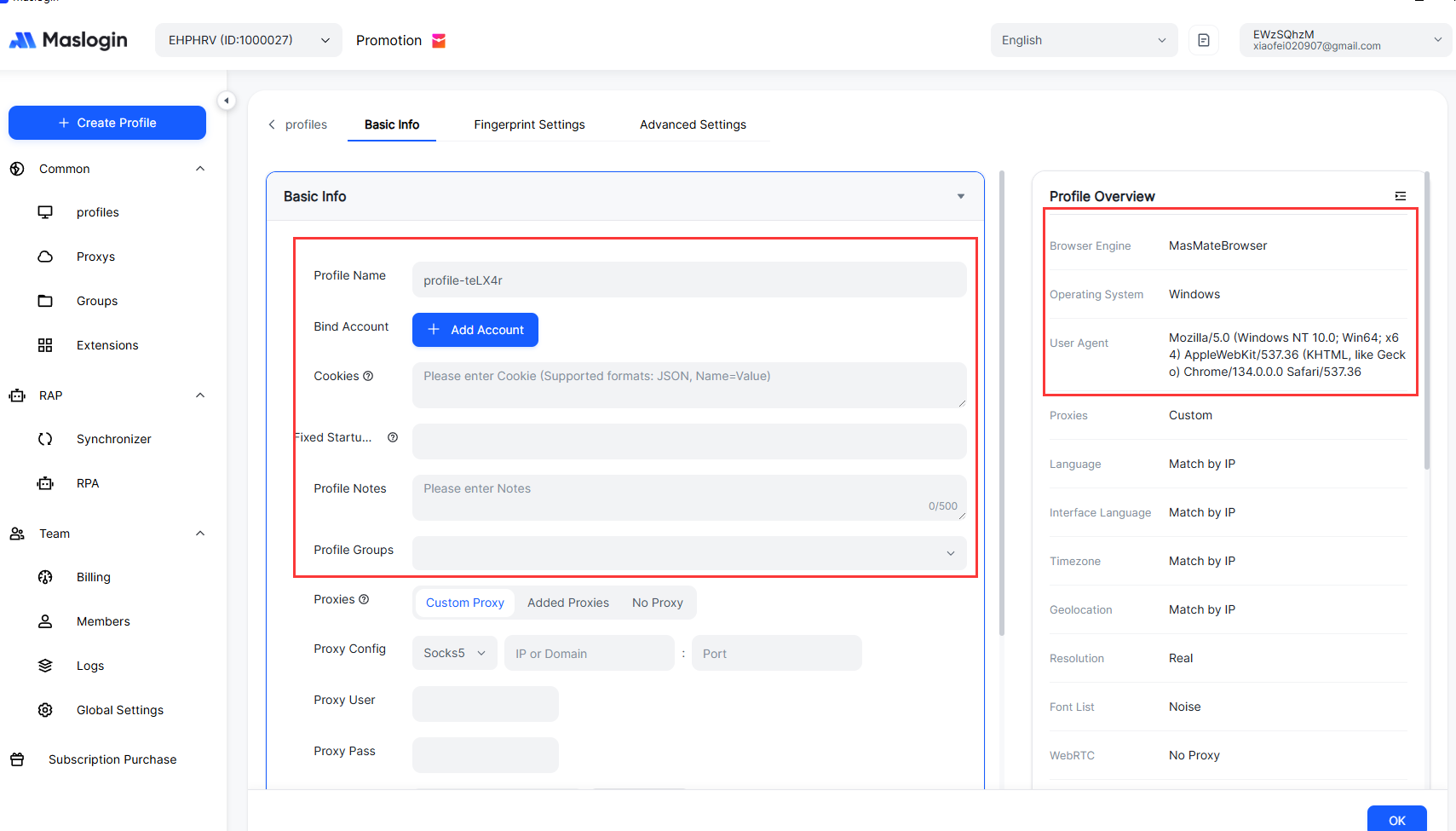
MasLogin is a professional anti-detection browser that can create independent browser environments for each account. Combined with temporary emails, you can operate as follows:
This method minimizes the risk of account association to the greatest extent and is suitable for scenarios like multi-store e-commerce operations and social media matrix management. For detailed operations, please refer to the MasLogin Help Center.
Even with temporary emails and fingerprint browsers, you still need to pay attention to the following details:
There could be several reasons for not receiving emails in your temporary inbox:
Solution: First, refresh the inbox. If there are still no emails, try switching to a new temporary email address and re-register.
TempMail itself does not actively leak your privacy, but the content of emails in a temporary inbox may be accessible to others (if they know the email address). Therefore, never use temporary emails to receive sensitive information such as passwords, ID numbers, or payment information.
For higher privacy protection, consider combining it with tools like MasLogin and using temporary emails within an isolated browser environment.
TempMail emails usually expire after closing the browser tab, and some emails may be retained for a few hours. If you need to keep email content long-term, it's recommended to manually copy it to a local document.
Temporary emails are practical tools for internet privacy protection, especially suitable for short-term verification and temporary registration scenarios. By using TempMail reasonably, you can effectively avoid spam, protect your real email address from being leaked.
For users who need to manage multiple accounts, it is recommended to use it in conjunction with the MasLogin Anti-Detection Browser to achieve bulk account registration while preventing platform association detection. Develop good online privacy protection habits, starting with choosing the right tools.
For more practical tips on account security and privacy protection, you can visit the MasLogin Blog for details.
Not recommended. Temporary emails are suitable for short-term verification and one-time registrations, and not for important accounts that require long-term management, such as financial or work accounts. Because after the email expires, you will not be able to retrieve passwords or receive important notifications.
Some websites block known temporary email domains (e.g., @tempmail.org). If you encounter registration failure, you can try switching to another temporary email service, or register with your real email and then unsubscribe from marketing emails.
TempMail and similar services do not actively disclose email content, but if someone knows your temporary email address, they can theoretically access the emails within it. Therefore, never use temporary emails to receive sensitive information.
Most temporary email services do not support extending the validity period. If you need long-term use, it is recommended to register a real but dedicated email for registration verification (e.g., a Gmail secondary account), or use a paid temporary email service that supports custom validity periods.
MasLogin can create independent browser environments for each account. By combining different temporary emails and proxy IPs, it prevents accounts from being identified as associated by the platform. For detailed operations, please refer to the MasLogin Glossary.
Outline