For Creators, Brands, and Ad Teams
In 2025, short-form video is the default traffic channel. Many creators, brands, and agencies quickly realize that one TikTok account is no longer enough:
you want to grow a personal brand, build a brand matrix, test different markets, and run paid ads at the same time. To do this well, multiple TikTok accounts become a natural step.
This article will answer three key questions in depth:
- Why should you create multiple TikTok accounts?
- How do you safely and properly create a second TikTok account?
- How do you efficiently manage multiple TikTok accounts across devices—and how can MasLogin help you operate a TikTok multi-account setup more professionally?
1. Why should you create multiple TikTok accounts?
![V5)2MHFL3]]`22TP{I57}]1.png](https://masmate.service-online.cn/production/files/0/1763693634464473596_79626.png)
Most people start with just one TikTok account. But over time, they realize that a single account struggles to handle too many roles and goals at once.
Common reasons to spin up multiple TikTok accounts include:
- Different content positioning needs separate channels One account focused purely on content: tutorials, reviews, comedy, vlogs. Another account focused on conversion: product demos, live selling, brand campaigns. This prevents lifestyle content from diluting the “brand authority” of your commercial presence.
- Separating personal identity from business identity A personal account to share your real life, personality, and interests. A brand/store account to showcase products, offers, and services in a professional tone. This helps build trust: people know when they’re seeing you versus your brand.
- Testing different markets and languages Dedicated accounts per country/region with localized language and angles. Different content styles, posting times, and trends for different audiences. You avoid “spamming” one mixed account with experiments that might hurt overall performance.
- Real-world needs of teams and agencies Agencies often operate multiple client accounts simultaneously. In-house teams may split accounts: “brand account”, “live streaming account”, “customer service account”, etc. Each account has a clear purpose and responsibility, which makes workflows more manageable.
In short:
The goal of multiple TikTok accounts isn’t “more for the sake of more” – it’s clearer positioning and more efficient operations.
2. How to create a second TikTok account?
This is where many people get stuck:
“I already have one account. Can I really create another one on the same phone?”
The answer is yes – TikTok officially supports multiple accounts on the same device. You just need to do it the right way.
(1) Basic steps to register a second TikTok account
To create a second TikTok account on the same phone, follow this flow:
- Open TikTok on your phone and go to your current account’s Profile page.
- Tap the three horizontal lines (≡) in the top-right corner.
- Select “Settings and privacy”.
- Scroll all the way down to the bottom of the page and find “Switch account / Add account”.
- Tap “Add account”.
- On the next screen, you’ll see two options: Sign up (create a new account), or Log in (to an existing account).
If you’re creating a brand-new second account:
- Choose “Use phone or email” under Sign up.
- Follow the prompts to fill in: Date of birth Phone number or email Verification code (if required) Password and username
- Once you’re done, TikTok automatically logs you into this new account and adds it to your account list on the device.
From that moment on, your second account is part of a multi-account setup on that same phone.
(2) Use a unique phone number: reduce risk, improve recovery
When creating a second account, it’s best practice to use a unique phone number or email for each account. This matters for three reasons:
- Security and account recovery Each account has its own recovery channel (phone/email). If one account faces issues or you forget its password, you can recover it independently. No messy overlap where multiple accounts rely on the exact same contact method.
- Cleaner compliance footprint Avoid using fake numbers or disposable emails to mass-register accounts—this is a red flag for most platforms. If you plan to grow long-term, treat each TikTok account as a serious digital asset with a real identity.
- Easier team handover and ownership clarity Some accounts belong to the company (brand phone/email). Others belong to founders or individual creators (personal phone/email). Separate bindings make it easier to handle team changes, audits, and legal/ownership issues later.
Simply put:
Your second account is not just a “throwaway alt” – it should be treated as a serious, standalone asset from day one, with its own clean, unique contact info.
(3) Ready to start? Do this 3-step pre-launch checklist
Before posting your first video on the second account, run this quick “launch checklist”:
- Clarify the account’s positioning and goals Is this a brand account? A test account? An ads-focused conversion account? Who is the target audience? Which region and language are you focusing on? What role does this account play in your overall TikTok strategy?
- Complete all basic profile and branding settings Username, profile picture, bio, link in bio (e.g. your website or store) should all align with its positioning. Decide if you should switch to a Business Account to unlock more analytics and ad tools.
- Design a “role split” between your accounts Main content account: grows followers, tells your story, builds trust. Conversion/ad account: focuses on offers, retargeting, and paid campaigns. Customer support account: handles DMs, post-sale questions, and service.
If your second account is born with a clear mission, it won’t become an afterthought that you only remember to log into once every few weeks.
3. How to manage multiple TikTok accounts?
Once you have two or more accounts, the question shifts from “how to create” to “how to manage them efficiently and safely”:
- When do you use which account?
- On which device?
- How do you avoid confusion and reduce risk?
Let’s break it down into three practical scenarios.
(1) Different accounts on different phones: simple physical separation
The most straightforward method is:
- Phone A: logged into Account 1
- Phone B: logged into Account 2
- Phone C: logged into Account 3 (for heavy operators)
Pros:
- Physical separation – notifications, inboxes, drafts, and sessions are cleanly separated.
- Less chance of posting from the wrong account, because each phone is tied to a specific role.
Cons:
- Higher hardware cost: you need multiple devices.
- Inconvenient when traveling or working on the go with limited gear.
- You still need a clear internal mapping of “which phone = which account” for teams.
Best suited for:
- Agencies or brands with spare devices.
- Scenarios where safety and stability are more important than convenience.
(2) Multiple accounts on the same device: use TikTok’s built-in switcher
If you prefer operating from one main phone, you can rely on TikTok’s native multi-account support:
TikTok gives you two core abilities:
- Add multiple accounts within a single app Via Settings and privacy → Switch account / Add account. Each newly added account is stored in an internal list.
- Switch accounts directly from the Profile screen Open any account’s Profile page. Tap the username at the top of the screen. A “Switch account” popup appears with your account list. Just tap the one you want to switch to.
Usage tips:
- Give each account a distinct profile picture and username so they’re easy to distinguish.
- Before posting or replying to DMs, always double-check the username at the top to ensure you’re on the right account.
- Try to keep each account’s content style consistent instead of mixing random topics in one place.
(3) Use the power of ads to boost efficiency
– Managing multiple TikTok accounts with MasLogin
Once you move into serious growth and paid advertising, multiple TikTok accounts become even more critical—and more complex:
- You may have content accounts, ad accounts, testing accounts, regional accounts.
- You need to log into different TikTok or TikTok Ads dashboards throughout the day.
- Multiple team members or external partners need access, but you also want to avoid password chaos and cross-contamination.
This is where a dedicated multi-account environment tool like MasLogin anti-detect browser can significantly help.
① Create an isolated browser environment for each TikTok account
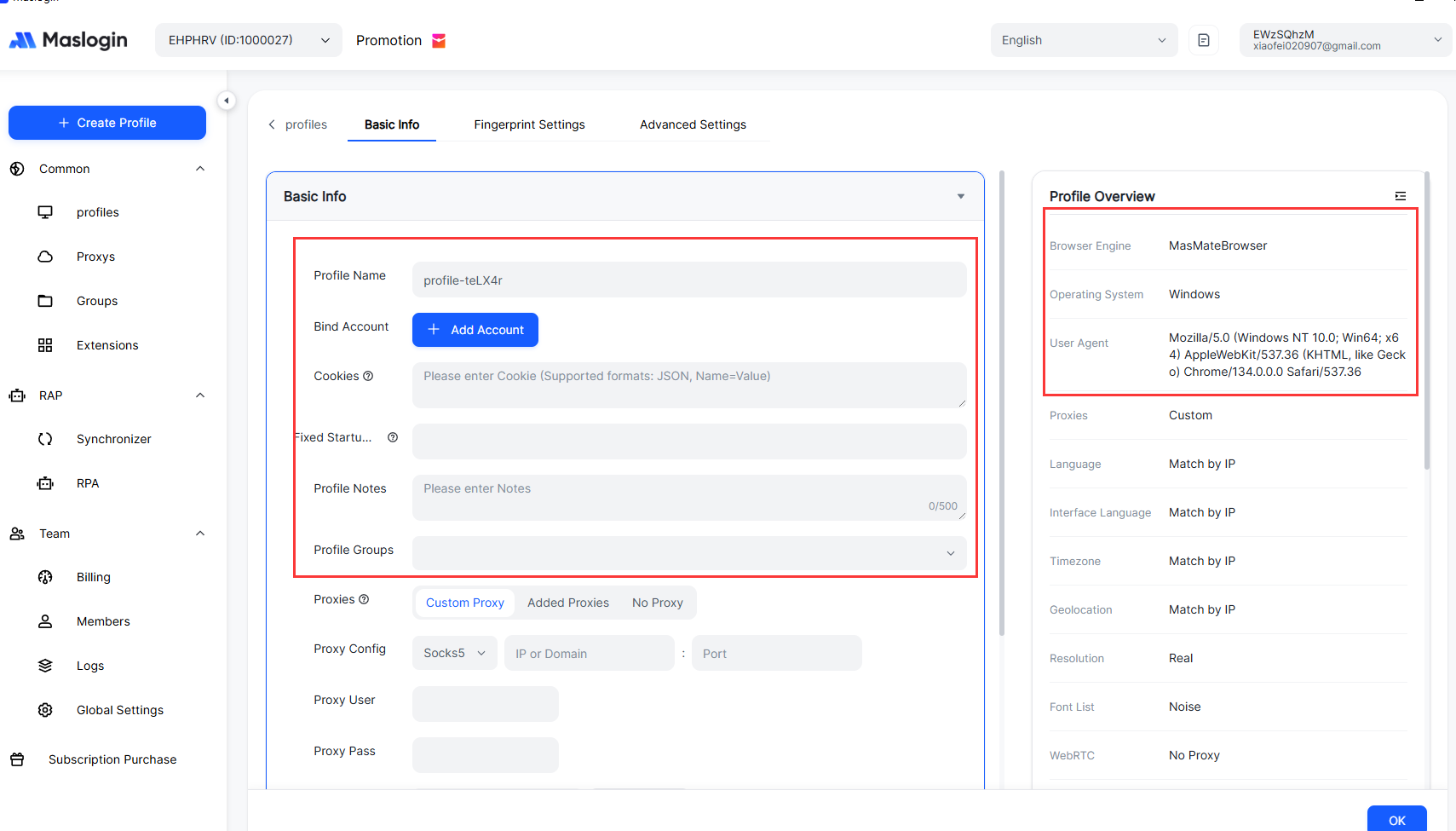
With MasLogin, you can create a separate browser fingerprint environment for each TikTok account:
- Each environment has its own cookies, local storage, and browser fingerprint.
- You can assign a different proxy IP (e.g. per country/region) to each environment.
- On a single computer, you can run multiple MasLogin windows at once, each logged into a different TikTok or TikTok Ads account.
The benefits:
- Avoid logging multiple accounts into the same vanilla browser profile, which can increase risk.
- Make each account look more like an independent user from a technical perspective—useful for multi-market, multi-brand matrices.
- Organize environments by project or brand instead of juggling dozens of browser profiles manually.
② Multi-user collaboration: share environments, not raw passwords
In an ad or growth team, you’ll often have:
- Internal media buyers.
- External agencies or freelancers.
- Creators and influencer partners.
With MasLogin:
- You can share a pre-configured environment for a TikTok/TikTok Ads account with team members without exposing the raw credentials.
- You can limit what environments each teammate can access, protecting sensitive accounts.
- Team members simply open MasLogin, select the right environment, and get into an already-logged-in TikTok or ad account, saving time on constant verification and logins.
③ Run content and ads in parallel with a more systemized setup
When you combine TikTok’s own ad ecosystem (Ads Manager / Business Center) with MasLogin’s environment isolation + collaboration, you can:
- Separate content accounts from ad accounts while managing them under one operational framework.
- Run A/B tests across countries, IPs, creatives, and accounts in a structured way.
- Gradually build a scalable TikTok marketing system, rather than relying on ad hoc logins and spreadsheets.
Important note: Tools like MasLogin are designed to help legitimate cross-border sellers, agencies, and ad teams manage environments, security, and productivity. They are not meant to encourage spam, fraud, or any activity that violates TikTok’s terms of service. Always use such tools within platform rules and local laws.
You can learn more about multi-account environment management on the official MasLogin website:
👉 MasLogin official site: https://www.maslogin.com/
FAQ: Common questions about creating and managing multiple TikTok accounts
Q1: Do I really need a second TikTok account? Isn’t one enough?
If you only post casual content, one account is fine.
But if you:
- Want to separate “personal life” from “brand content”;
- Plan to target different countries or languages;
- Need to balance organic content, ads, and customer service;
then a second account often gives you clearer positioning and better execution.
Q2: Can I use the same phone number to create multiple TikTok accounts?
From a practical standpoint, it’s better to give each serious account its own phone number or email:
- Higher security: each account has its own recovery channel.
- Fewer verification conflicts and less confusion.
- Cleaner for ownership and legal purposes when teams or roles change.
Q3: Does logging multiple accounts on the same phone increase the risk of getting banned?
TikTok’s built-in “Add account / Switch account” feature exists for a reason—reasonable multi-account use on one device is supported.
The real risk comes from behavior such as:
- Spammy content and engagement farming.
- Mass-creating fake or disposable accounts.
- Highly repetitive or abusive actions over a short time.
Multiple accounts are not the problem; what you do with them is.
Q4: If I want to run accounts in multiple countries and manage several ad accounts, do I have to use a tool like MasLogin?
It’s not mandatory, but once you:
- Operate several markets and product lines,
- Manage multiple TikTok/TikTok Ads logins,
- Have multiple team members working in parallel,
a tool like MasLogin can drastically improve:
- Security (environment isolation, controlled access).
- Efficiency (no constant re-logins, no messy shared browsers).
- Structure (clear mapping between environments, accounts, and campaigns).
For solo creators with 1–2 accounts, TikTok’s multi-account switcher is usually enough.
For multi-account matrices and ad teams, environment tools become a big productivity and safety win.




_00000.png)