If you’ve ever seen a pop-up saying “This website uses cookies” and clicked “Accept All” without a second thought — you’re not alone.
But have you ever wondered what exactly cookies are and why nearly every website uses them?
In this article, we’ll break down what website cookies are, how they work, why they matter for privacy, and how to manage them effectively.
By the end, you’ll understand why cookies aren’t just a snack — they’re the digital backbone of how the modern web functions.
HTTP cookies, commonly known as website cookies, are small pieces of data that a website stores on your browser while you’re visiting it.
They act like tiny memory cards that allow websites to “remember” who you are and what you did during your visit.
Cookies are essential for things like:
👉 For more on how websites track users, read our guide:
What Is Browser Fingerprinting and How to Prevent It (2025)
Cookies were invented in 1994 by a 24-year-old Netscape programmer named Lou Montulli.
He needed a way to save user data — like shopping carts — without overloading company servers.
Inspired by an old concept called the “Magic Cookie”, Montulli designed a system that let websites store small data files directly on the user’s computer.
This innovation revolutionized the web, allowing for personalized browsing experiences that remain fundamental today.
When you visit a website for the first time, it saves a small text file (the cookie) on your browser with a unique ID.
This ID helps the site recognize your device when you return.
Example:
You add products to your shopping cart → close the site → reopen it later — and your cart items are still there. That’s the cookie at work.
Cookies can store:
They are domain-specific, meaning one website’s cookie cannot directly read another’s.
However, there’s an important exception…
These are created directly by the website you’re visiting.
They help with user experience — saving preferences, logins, or cart data.
Example:
When you return to a site and it remembers your language setting — that’s a first-party cookie.
These come from external sources — like embedded ads or social media buttons.
For instance, if a website includes a “Like” button from Facebook, that button communicates with Facebook.com, allowing it to track your activity even outside Facebook.
This practice sparked major privacy concerns and led to the creation of GDPR (General Data Protection Regulation) in Europe, which requires websites to ask for consent before using cookies.
Not all cookies are bad.
They’re vital for creating a smooth user experience, but when misused — especially by advertisers — they can compromise your privacy.
Potential risks include:
That’s why cookie banners now exist: websites are legally obligated to disclose how they use cookies.
You can control cookies easily from your browser settings:
👉 Pro Tip: Many privacy-focused browsers also block browser fingerprinting, a more advanced tracking method that doesn’t rely on cookies.
Cookies are small data files stored locally by websites to save users’ login status and preference information. In MasLogin, users can legally import and share cookies to quickly log into team members’ work accounts without repeatedly entering passwords.
This method is especially suitable for:
The authorizer (account owner) uses a browser extension or MasLogin’s built-in function to export the cookies file (format: .json or .txt).
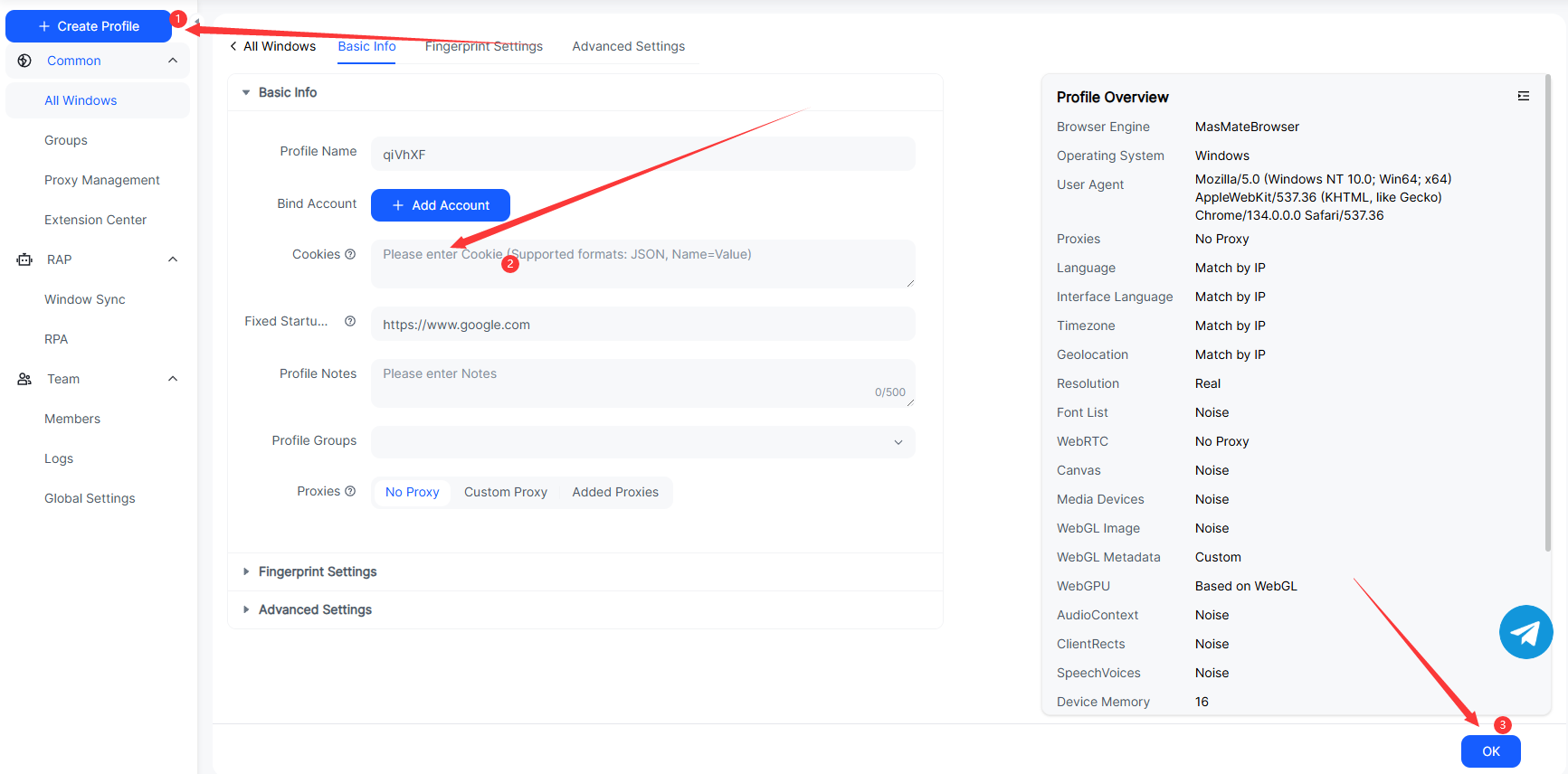
Click “Create New Environment” in the MasLogin control panel and set the browser name, operating system, and proxy IP.
Open the environment → click Cookies Management → import the cookies file to automatically log in to the corresponding account.
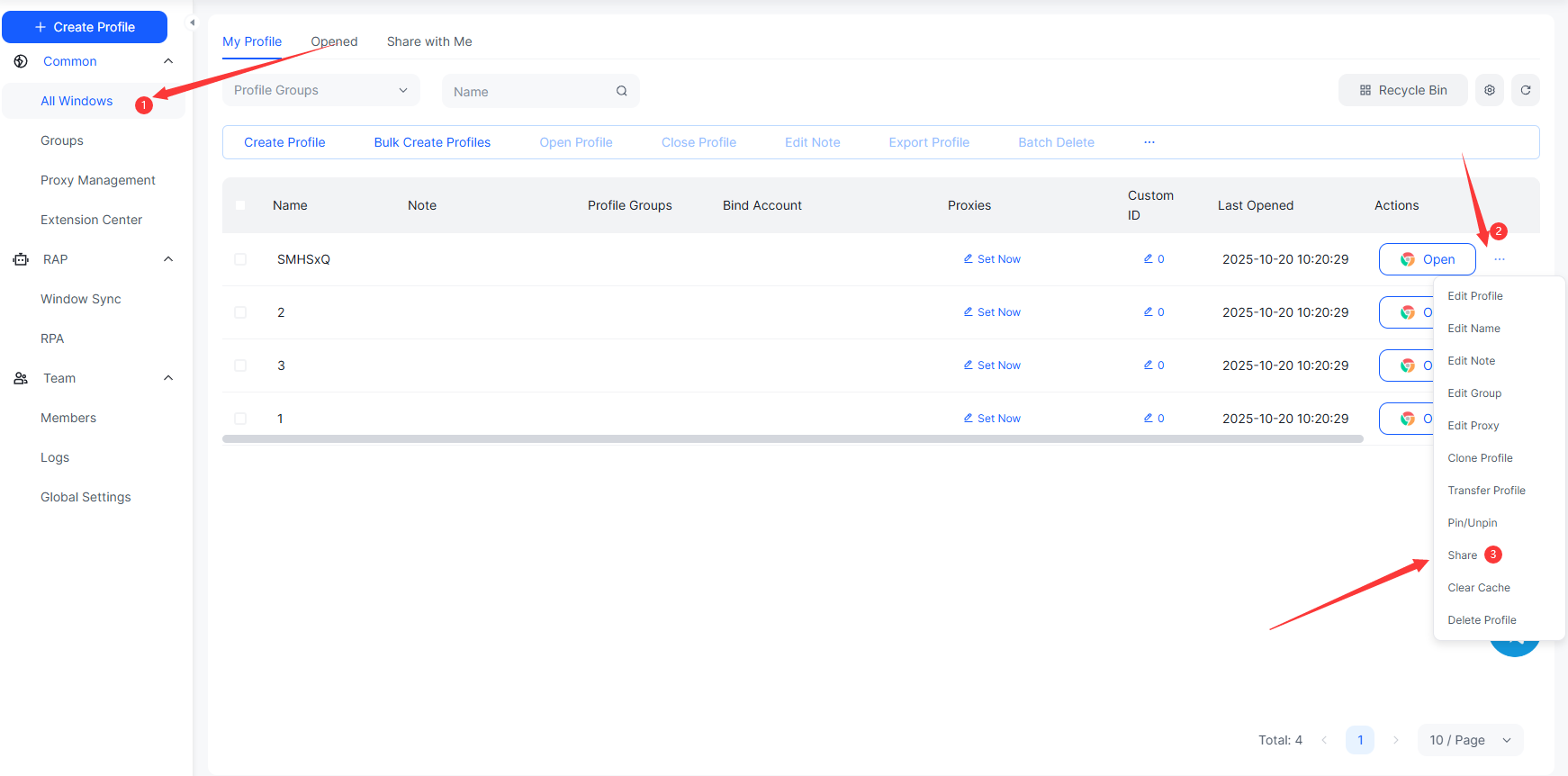
Click the “Share” button on the right side of the environment → enter the team member’s email or share link so that colleagues can directly log in to the same environment in their MasLogin client.
💡 Tip: MasLogin’s cookies login is fully based on user authorization and encrypted data, never storing third-party account information to ensure security and compliance.
Q1: Are cookies the same as cache?
No. Cookies store user-related data like logins or preferences, while cache stores website files (images, scripts) to make pages load faster.
Q2: Can cookies steal my personal information?
Not directly. Cookies don’t access your files, but they can track your behavior if shared with third parties.
Q3: Should I delete cookies?
Yes, occasionally — especially if you share your device or want to prevent ad tracking.
Q4: What happens if I block all cookies?
Some websites may not work properly — for example, you might get logged out automatically or lose saved shopping carts.
Q5: Are cookies being replaced?
Yes, gradually. Google announced plans to phase out third-party cookies and replace them with privacy sandbox technologies by 2025.
Outline
_00000.png)